
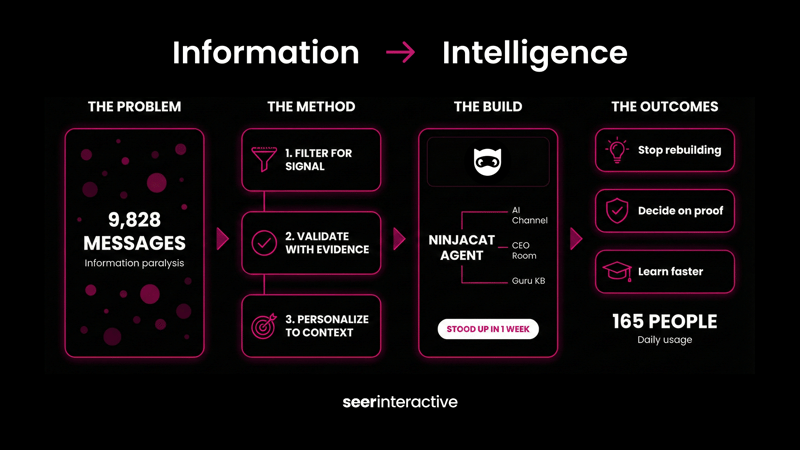
9,828 messages is 25 messages a day… and that's from just a single channel.
Every company has an AI channel or repository where people post new tools, new ways, new prompts, new model launches, new research, new ideas, new prototypes…. It's overwhelming.
You know there's quality, but keeping up with every single post and doing something with it. Nearly impossible. Definitely exhausting.
This is the reality of teams working to innovate at scale: It's messy. Every team, org, company is dealing with more and more information today, it's what you do with that information that counts. But it's becoming an impossible task. Or so it seems.
Until Crystal, my co-CEO, shared just 3 prompts on how she keeps up with 9.8K slacks using the Claude <> Slack connector. She's not overwhelmed by the Slacks anymore. That's nice. What's the business outcome? She has a system to apply intentionally selected information to current projects and our business reality.

Be the hero, build this system yourself...
Before you can build anything, you need to reframe the question.
Wrong question: "What tools should I be using?"
Right question: "How do I make this information usable?"
Crystal wasn't trying to read 9,828 messages. She was trying to answer:
Which tools keep coming up repeatedly?
How are people actually using them?
What fits MY reality vs. just looks impressive?
Scanning through slack, message by message, trying to find the tools that keep coming up over and over again from my co-workers Is a fool's errand.
The prompt is simple:
-
-
- Scan the channel
- Ignore one-off experiments
- Surface tools that are mentioned repeatedly, by multiple people, over time
-
When we did this internally, a few things immediately stood out:
-
-
- Certain tools kept reappearing in different contexts (not just one person experimenting)
- Some tools were showing up in execution conversations, not just curiosity threads
- Others looked impressive, but never made it past "cool demo" status
-
The system, in only 3 prompts!
Clear and explicit instruction contains: orientation → usage → relevance
Prompt 1: Orientation (Tool Discovery, Bias-Resistant)
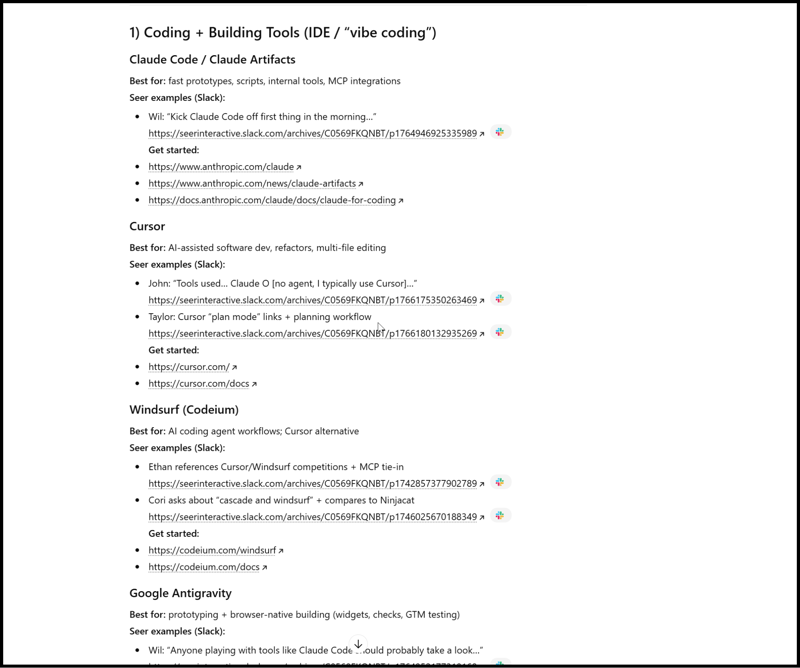
Go through Slack and find the [your-AI-channel] channel. Identify AI tools that are mentioned positively by team members. Only include tools that appear multiple times, surface at least [X] tools, prioritize tools based on popularity in this slack channel. For each tool, provide the following: Tool name, short description of what it is (1 line max), and the person who posted about it with a short summary of what their context / use case was.

Search our Slack channel (or whatever your AI discussion channel is) for AI tool mentions from the past [6 months/1 year].

For each tool that appears at least [3] times:

1. Tool Name & Category: What type of tool is it (IDE/coding, design, research, etc.)
2. Best for: One concise line describing primary use case
3. Seer examples: Find 2-3 specific mentions from team members that show:
   - Who said it (first name only)
   - A direct quote or paraphrased use case
   - Link to the Slack message
4. Get started: Official website and docs links

Format this as a structured document with clear sections for each tool category. Prioritize tools by mentioning frequency and recency of discussion.
Now: You have a list of tools.
Next: Stop and decide: Do you want a list of tools, or do you want personal relevance? Neither wrong, but both different use cases.
Prompt 2: "Tell me how people are using these tools."
For each tool I've identified as relevant from Part 1, create a detailed profile by searching Slack comprehensively:

1. How Seer is actually using it:
   - Find ALL mentions in Slack (not just the initial 2-3 from Part 1)
   - Group by use case pattern (e.g., "client deliverables," "internal automation," "exploration")
   - Include direct quotes showing the context: "Person: 'quote about what they built/tried'"
   - Note frequency: Is this one person's experiment or widely adopted?

2. Slack evidence trail:
   - Provide clickable links to every relevant Slack message
   - Include dates to show adoption timeline
   - If there are threads, note key insights from replies

3. Demonstrated capabilities (from Slack only):
   - What team members have actually built or accomplished
   - Problems they've solved with it
   - Workflows they've replaced or accelerated
   - Any mentioned limitations or frustrations
   - If no concrete examples exist beyond "this looks cool," state: "No demonstrated use cases found - mentioned as potential tool only"

4. Getting started resources:
   - Official documentation URL
   - Any tutorials or guides Seer team members have shared in Slack
   - If team members mention a learning curve or setup gotchas, include those

5. Gaps & uncertainties:
   - If usage details are vague, state what's unclear
   - If only one person has tried it, note that
   - If there are unanswered questions in threads, highlight them

Organize by tool, maintaining the same category structure from Part 1. Focus on evidence over speculation - if Slack doesn't show concrete usage, say "Limited usage documentation" rather than inventing scenarios.
Prompt 3: "Based on how I work and what I'm thinking about, which of these tools would actually help me?"
Review the tools from Part 1 alongside:
- My recent Fireflies transcripts (past [2 weeks/month])
- My stated current projects and challenges
- Problems clients have mentioned that we're trying to solve

For each tool that could accelerate my work:

1. Why this matches my context: Reference specific projects, client needs, or problems from transcripts
2. What it unlocks: Concrete capabilities I don't currently have or things I'm doing manually
3. Tradeoffs (if applicable): If multiple tools solve similar problems, compare them briefly

Organize recommendations by impact potential (high/medium) rather than alphabetically. Focus on [x] tools maximum.
Step 2: Test Fast, Not Perfect
Become the person who owns this at your company…
Once you have the prompts working, you face a choice: run them manually when you need them, or build something that makes the intelligence available instantly.
We've laid out the 4 types of AI marketers and how to progress. Find out where you stand with this self assessment GPT →
Crystal chose to build. One week later, our team had a working AI coach connected directly to our Slack channels and knowledge base.
From 9,828 messages of overwhelm to on-demand, personalized guidance in seven days.
NinjaCat Agents
Crystal's V1 "AI Tools Coach" Ninjacat agent connects directly to:
-
-
- Our AI channel (where 9,828 messages live)
- Our CEO room (where 2,078 strategic AI discussions happened last year)
- Our Guru knowledge base (where documented solutions live longterm)
-
So is this a smarter search/simply querying a larger more disparate dataset? No it's bigger than that by a mile!
1. This system discovers what already is talked about in your company's AI slack
Business outcome: Time saved not wasting time ideating on something that's already been thought of, and maybe even built
-
-
- "Is there already a custom GPT that does what I need?"
- "Did someone build a workflow I can just use?"
- Direct links to existing solutions in Guru
-
2. This system provides contextual recommendations to your problems, use case
Business outcome: Reduce failure / increase efficiency by leveraging and investing time and money in tools that have testing, adoption, and proof
-
-
- "What are the most-used tools across Seer?" (Not most-mentioned, most-USED)
- "I need image generation for client presentations" Get: Specific tools, specific use cases from teammates, specific links to their Slack discussions
- Claude, GPT, NotebookLM, Descript, Claude Code topped the list - based on volume of real implementation discussions
-
3. This system teaches through your team's experience
Ask: "Help me understand Claude Code and Antigravity" + get specific, actionable advice based on real experience
Business outcome: Automated learning & enablement, compressing weeks of learning curve into hours by following proven implementation paths, like:
-
-
- How YOUR teammates are using them
- What problems they've actually solved
- "Start here if you're trying to do X, start there for Y"
-
The plot twist: She wasn't done
A few days later, Crystal shared a video with the team where she "built a version using Cursor, for fun."
For fun.
She'd never used Cursor before. Didn't read the documentation. Just opened it up and started building.
6 hours later? Working web application that syncs with Slack, pulls from Guru, and surfaces the same insights.
Is it available to the team yet? No, but that's not the point.
The point is what happens when "I wonder if..." becomes "Let me try"
Crystal kept Claude open the entire time. When Cursor did something she didn't understand, she'd flip to Claude: "Explain what just happened." Then back to the building.
No courses. No tutorials. Just:
-
-
- A problem she understood deeply
- A tool recommended by her own agent
- The willingness to build ugly first drafts with AI as her co-pilot
-
Here's the thing: Crystal is our Co-CEO. NOT an engineer. Not a "technical person."
But she saw 165 people overwhelmed with AI possibilities and decided to build a solution for the team proactively.
Twice. In different ways. In two weeks.
AI tools don't check your title. They don't check your years of experience.
What matters today:
-
-
- Understanding the problem deeply enough
- Being curious and impatient enough to figure out how to solve it
-
And being willing to build the ugly first version that actually works, yourself.
If you're sitting on thousands of Slack messages (or teams messages, or emails…) about ways to use AI, AI tools & solutions right now, you're sitting on a goldmine of institutional knowledge.
Your role doesn't define what you can build anymore. Your curiosity does.
Bonus Prompt: If You Want Personal Relevance
"Based on how I actually work, which of these tools gives me the most leverage right now?"
When I ran that prompt against my own history and behavior, a clear pattern emerged:
The tools that mattered most to me were the ones that:
-
-
- Collapse thinking → proof → action
- Reduce dependency on handoffs
- Let judgment scale without adding people
-
That's why tools like Claude Code and Antigravity consistently surfaced as more valuable to me personally than flashier tools that might be objectively impressive.
Not because they're better.
But because they match how I operate:
-
-
- I want to test ideas quickly
- I want to validate before selling
- I care more about leverage than polish
-
The same list would look very different for someone whose job is:
-
-
- Client delivery
- Creative production
- Reporting at scale
-
And that's the point.
What This Actually Solves
This method works for any information overload problem marketing leaders and leaders in general face.
If you're worried about "keeping up with AI", you're missing the point. This is about turning ambient intelligence into personal leverage.
In this case, Slack already contains:
-
-
- What's working
- What's noise
- What people are actually doing when no one's watching
-
Large language models just give us a way to listen, selectively. Intentionally.
"
If you're overwhelmed right now, I'd argue that's not a failure. It's a signal that you need a better filter, not more tools.
And the filter is already sitting in your Slack history.


.png)
.png)