

If you’ve been in analytics long enough, you know the pain. You're in a meeting, someone asks "Which content drove the most conversions last month?". It seems simple, but you know the truth: it’s hours of digging through GA4, creating custom segments, cross-referencing with your email platform, and building a report. All for that one simple question.
What if you could ask that question in plain English and get the answer in 30 seconds?
That's the future we’ve been building at Seer. And you can too.
It's creating a fundamental shift from static reporting to strategic conversations. We’re in the answers business, and this is how we’re getting them faster than ever.
What Was Built (And Why It Matters)
We believe the best analytics insights come from curious humans asking questions in real-time, not from reports built days later. Most marketing teams spend more time accessing their data than analyzing it.
Here's what happened when we tested this: We asked our system, "Which blog post drove the most newsletter signups last month?" Within seconds, it analyzed our GA4 data, identified the relevant events (and even flagged some tagging issues for us to clean up), and delivered the actual results.
The answer? Our rank tracking blog post had 46 signups. But the real value is the system automatically provided context by comparing against other blog posts and noted that "referral traffic from these sources is also driving some sign-ups, which aligns to earlier finding that AI-related content is performing well."
That’s the difference between a query tool and an analytical partner. It retrieves data AND it provides a high-quality level of insight generation.
The Technical Foundation: Google Analytics MCP
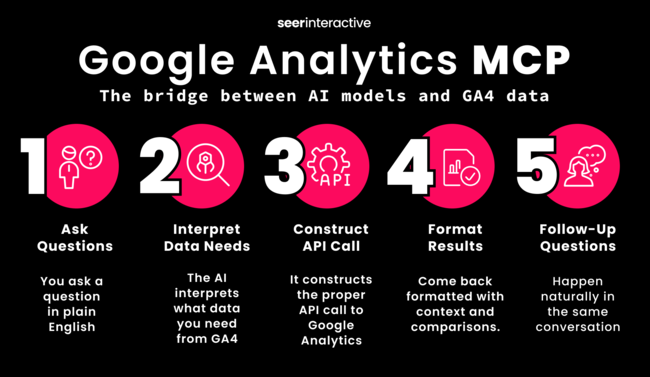
The “AI-magic” happens through Google's Model Context Protocol for Analytics, which creates a secure bridge between AI models (like Gemini or Claude) and your GA4 data.
Here's how it works:
- You ask a question in plain English
- The AI interprets what data you need from GA4
- It constructs the proper API call to Google Analytics
- Results come back formatted with context and comparisons.
- Follow-up questions happen naturally in the same conversation
Beyond a “query translator”, this uses the AI's reasoning capabilities to provide context, identify patterns, and suggest next steps.
Setting This Up: You Can Do This Today
We’ve integrated this with both Gemini and Claude, connecting GA4, BigQuery, paid search platforms, and other marketing data sources. Here's how to start.
Prerequisites: What You’ll Need
- Google Cloud account with billing enabled (don't worry, the costs are minimal)
- GA4 property with admin access
- Basic Python environment (or willingness to set one up)
- About 2 hours for setup and testing
Step 1: Google Analytics Configuration
(This foundation is the same for both Gemini and Claude.)
Enable the Analytics Data API:
- Go to the Google Cloud Console
- Navigate to APIs & Services > Library
- Search for "Google Analytics Data API v1" and enable it
Create your service account:
- Go to IAM & Admin > Service Accounts
- Click "Create Service Account"
- Name it something like "ai-analytics-connector"
- Once created, click on the service account email
- Go to Keys tab > Add Key > Create new key
- Choose JSON format and download the file
Grant access to your GA4 property:
- In Google Analytics, go to Admin > Property Access Management
- Click the blue + button > Add users
- Paste your service account email
- Grant "Viewer" role
- Click Add
Find your GA4 Property ID:
- In GA4, go to Admin > Property Settings
- Your Property ID is the number at the top (looks like: 123456789)
Step 2(A): Gemini Integration Path
If you want to use Google's Gemini model, here's your setup:
Get your Gemini API key:
- Go to Google AI Studio
- Click "Get API key" in the left navigation
- Create API key in new project
- Copy the generated key
Install required libraries:

pip install Flask google-analytics-data google-generativeai
The Flask server code: I won't paste the entire codebase here (it's about 200 lines), but the key components include:
- Authentication handling for both Google Analytics and Gemini APIs
- Natural language processing to convert questions into GA4 queries
- Response formatting that makes the data actually readable
- Error handling for when queries don't work as expected
Step 2(B): Claude Integration Path
If you prefer Claude, here's your setup:
Get your Claude API key:
- Go to Anthropic Console
- Navigate to API Keys
- Create a new key
- Copy the key (starts with sk-ant-)
Install required libraries:

pip install Flask google-analytics-data anthropic python-dotenv
The Claude integration includes more sophisticated query interpretation in my experience, and it's better at understanding complex multi-dimensional questions.
Real Examples: What This Actually Looks Like
Here are some queries we've tested that work beautifully:
Traffic Analysis: "What are my top 5 pages by mobile traffic this month?"
Campaign Performance: "How did my organic traffic compare to paid traffic for blog posts in Q3?"
User Behavior: "Which countries are driving the most engaged sessions this week?"
Hypothesis Testing: When we asked about newsletter signup trends, the system not only showed me the decline but suggested hypotheses and recommended validation approaches: "Maybe increased competition, content freshness issues, or shifts in user search behavior."
💡The key is to ask questions the way you'd ask a human analyst when exploring a hypothesis.
Here's The Good, The Challenging, and The Advantage
The Good:
- 50% time reduction on routine analytical questions
- Real-time insights during client calls and strategy sessions
- Accessible to non-technical team members - our account managers are using this successfully
- Context-aware follow-ups - it remembers what we just discussed and builds on it
The Challenging:
- Setup complexity - this isn't a one-click solution
- Query refinement needed - sometimes you need to rephrase questions
- API limitations - Google Analytics quotas and data sampling still applies
- Cost monitoring - API usage can add up with heavy use
The Game-Changing:
The breakthrough isn't the speed (though that’s nice), it’s what’s comes after instant access: When we tested declining newsletter signups, the system didn't stop at showing the trend– it suggested reasons and validation tests.
The Business Case: Why You Need This
The most valuable analytics work happens when we can iterate quickly on hypotheses. Here's what this means practically:
For Client Meetings: We explore questions live and show clients data-driven insights in real-time, instead of saying "...let me get back to you."
For Campaign Optimization: We test assumptions while campaigns are running, not after they end.
For Strategic Planning: When stakeholders ask "what if" questions, we can model scenarios using actual historical data patterns.
For Our Team: It handles the routine questions, freeing us to focus on more complex strategic work.
As our founder, Wil Reynolds puts it: "Imagine if we said, hey, we're gonna take those hours we used to spend on reporting, we got stuff we wanna go do for you in Reddit, we got stuff we wanna go do for you in YouTube, we got stuff we wanna go try for you in TikTok. Now we have invented time for things that have a chance to grow your business, versus we know that reporting doesn't grow a business."
Your Practical Next Steps
This doesn’t have to be an all-or-nothing overhaul. Start small.
Week 1: Technical Setup
- Configure Google Cloud and GA4 permissions
- Choose and set up your AI integration (Gemini or Claude)
- Test with basic queries
Week 2: Team Training
- Train 2-3 power users on query techniques
- Document your most common analytical questions
- Build a library of proven queries for your business
Week 3: Full Deployment
- Roll out to broader team
- Integrate into client meeting workflows
- Start tracking time savings and insights quality
.png?width=650&height=377&name=AI-Assisted%20Analytics%20-%20Inline%202%20(1).png)
The Real Power of Multi-Source AI Analytics
GA4 is just the foundation. The real transformation begins when you ask questions across all your marketing data sources in one conversation.
Our Founder, Wil Reynolds has been at the front this approach with our BigQuery integrations. One of our clients asked about branded impressions. Wil asked Claude, which ran queries against BigQuery. The numbers didn't feel right, so he asked a follow-up: "How do you determine brand?"
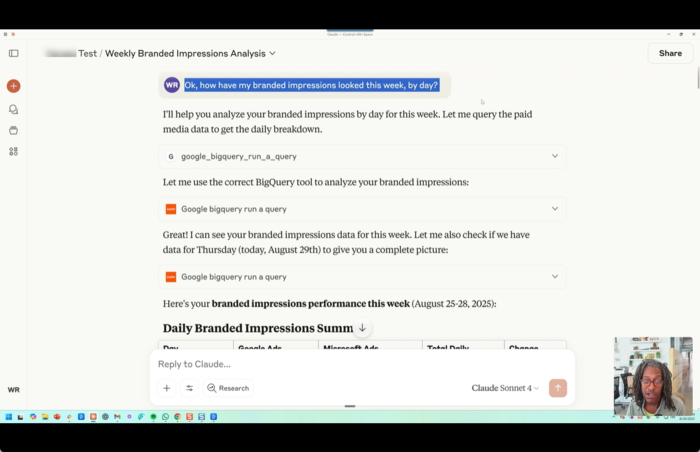
The AI explained its methodology, revealing a crucial insight: we need to be more specific about which branded campaigns to include. One refinement later–"show me data for [Client] brand USA guest campaign specifically", and boom - we had validated, accurate results.
Then came the game-changer: Wil asked, "Look at the changes we made to this campaign. What do you think caused these changes in impressions?" The system identified patterns, noted that "you started strong in week two, but you dropped significantly in click-through rate," and offered hypotheses.
This is how we fundamentally change the conversation from “what happened?” to “why did this happen, and what should we do next?”
The goal isn't to replace analysts, it's to make every marketer more analytically empowered and every team more strategically valuable.
Ready to Transform Your Analytics Process?
At Seer, we believe that the best analytics tools feel like a conversation. This setup is how you start talking with your data.
If you're ready to transform your process, start with the technical setup I've outlined above. The future of analytics isn't about having more data, it's about having better conversations about your data.
What's the first question you'd ask your data if you could just... ask it?
Want help setting up your own Google Analytics MCP server? Book Time with our Team.

.png)
.png)