

Google is rewarding advertisers who lean into broad match with Smart Bidding, AI Max, and Performance Max — with access to brand new inventory in AI-driven placements in AI Overviews (AIOs) and AI Mode. While Google doesn’t provide reporting on AI Mode and AIO placements (and has not announced any plans to do so), we do know that adopting these features is required in order to be eligible.
Our take: Testing these AI-Driven campaign types and bidding models should be a priority for advertisers, especially those experiencing declines in visibility with the rollout of AI-driven SERP results.
Of course, many are rightfully hesitant to test these features, and some advertisers may not be ready. Without the right guardrails in place, any one of these campaign types or bidding models can quickly become a major source of inefficiency. Before testing, here are the key considerations for each that we’re incorporating into our approach.
Broad Match
Unlike other match types, broad match keywords are able to take additional signals like user location and previous searches into account.
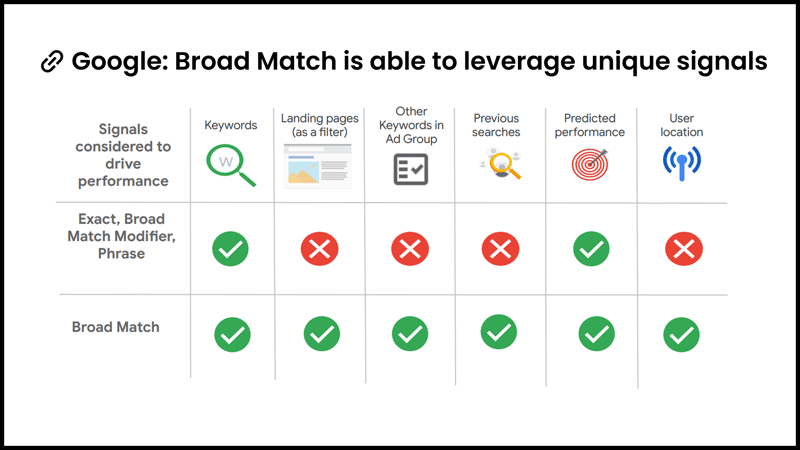
These additional contextual signals are great for finding incremental, relevant searches to scale campaigns and can even help to improve campaign performance over time. However, because additional data points are taken into account to expand your reach, having quality conversion signals becomes even more important. We can also expect to see a longer (and more expensive) initial learning period.
Our Recommended Guardrails for Testing Broad Match:
- Allow for a longer testing period. Broad match requires time to optimize. Anticipate four to six weeks of testing to get reliable results, and avoid making changes too early, as that can reset learnings
- Dig into the search terms report daily. During the first two weeks of testing, you should be reviewing the search terms report closely. Beyond excluding wildly inefficient traffic, make sure to also exclude irrelevant, low-engagement traffic.
- Consider Smart Bidding a non-negotiable. Without Smart Bidding in place, you're unable to leverage the additional contextual signals that broad match relies on as a lever, making it much more likely to include irrelevant, low-quality traffic.
- Know when to skip A/B testing. While we love leveraging broad match experiments for quick implementation and insights, splitting traffic can be detrimental for lower-volume campaigns. If you don’t have sufficient conversion volume to support valid results, it’s better to avoid A/B tests.
- Ensure you have qualified conversion signals. Without qualified conversion signals, broad match will go after anything that converts. If you're getting spammy or low-quality leads, broad match will find more of those. It doesn’t know better.
 What Do We Mean By “Qualified Conversion Signals”?
Qualified conversion signals are quickly becoming the most important inputs you can give the system — not just for broad match, but across all of Google’s AI-driven campaign features.
So what is a qualified conversion? A qualified conversion is a lower-funnel, outcome-based signal tied to meaningful business value. While this will vary by business, the key is that your conversion tracking and campaigns are structured to feed the system with the right information. Examples include:
- Leads that have been qualified via offline conversion data such as a marketing qualified or converted lead
- Calls that are qualified by duration or offline conversion data (e.g. only including calls that are 2+ minutes)
- Completed transactions or revenue-driving events (e.g. donations, subscription activations, or final checkout completions)
Many advertisers won’t have enough volume of converted leads or completed purchases to optimize exclusively toward the lowest-funnel conversions. Google generally recommends maintaining steady conversion volume (around 30 conversions in a 30-day period) for automated bidding to learn effectively. But even if you fall short of that threshold, passing these deeper signals into the account still helps the system better understand what drives business value. This is also where value-based bidding can come in.
If Google can’t tell the difference between junk and value, it will optimize toward whatever is easiest to get. Qualified conversion signals give the algorithm information it needs to understand what “good” looks like.
AI Max
AI Max is Google’s newest AI-powered campaign type that can be leveraged as a potential substitute or supplement for broad match, as well as a potential replacement for Dynamic Search Ads (DSA). It can essentially be thought of as a Search Network-only Performance Max campaign.
Much like when Performance Max was rolled out, AI Max is launching with its fair share of controversy and is being pushed heavily by Google reps. The good news is that this time Google has given advertisers a bit more transparency and control. Unlike early Performance Max, advertisers will have visibility into the search terms AI Max is matching to and will be able to negate them. Advertisers can also opt out of some of the more controversial features that, in our opinion, may not be fully ready yet or may not be suitable for every advertiser.
All of this means that before testing AI Max, advertisers need a clear understanding of what each setting does and how to review performance impact. Below is a breakdown of the three AI Max features you should review before opting in.
- Search Term Matching
Opting in to AI Max will enable search term matching. Similar to broad match and Dynamic Search Ads, AI Max uses signals beyond your keyword list to determine which queries to match to; including your landing page content, ad copy, and the keywords already in your ad group.
In theory, these signals are intended to inform how far AI Max can expand. In practice, we’ve seen that AI Max does a very poor job of matching search terms to relevant campaigns and ad groups - Text Customization
Text customization is an optional feature that allows Google to dynamically generate new headlines and descriptions based on your website content, existing ads, and keywords “to help you generate assets that are more relevant to people’s search queries”.
Ever bid on competitor keywords? Then you’ll immediately see the risk. This setting requires extremely close oversight. Because AI Max can pull from virtually any readable text on your site, advertisers have seen unexpected copy show up in ads. One advertiser we work with even had ad copy generated from image alt text, which led to unfortunate results. While you can manually remove unsuitable text, the risk seems to outweigh the potential advantages. - Final URL Expansion
Final URL expansion is an optional feature, but it requires text customization to be enabled. In practice, it functions very similarly to how DSA or Performance Max campaigns allow Google to send users to a different landing page than the one you selected if it predicts better performance.
This setting should be tested with caution. Most advertisers don’t have every page on their site optimized to convert. When final URL expansion is turned on, Google can route traffic to informational pages, outdated content, or pages that simply aren’t built to drive action, unless you manually set limitations with URL exclusions.
AI Max Can Muddy Your Campaign Structure
We already see increasing search-term crossover between campaigns and ad groups in accounts due to close variants, loosened match-type rules, and new campaign types like Performance Max — but AI Max takes this to the next level. Based on Google’s descriptions, search term matching should behave similarly to broad match or DSA; however in testing we’ve seen AI Max expand much more aggressively.
For example, in a non-brand campaign promoting a specific line of business, AI Max began picking up:
- Terms related to entirely different lines of business
- General branded queries
Because we had text customization and final URL expansion turned off, this resulted in AI Max routing users to copy and landing pages that weren’t aligned to their search. When we reached out to our Google rep for guidance, their suggestion was to turn these features on or add additional negatives, which became a game of whack-a-mole.
As a result, AI Max may be better suited for campaigns with inherently broad themes, such as general terms campaigns or brand campaigns.
Our Recommended Guardrails for Testing AI Max:
All of the same considerations we have for testing broad match apply, but we would also add:
- Be mindful of how enabling AI Max could impact your campaign structure. AI Max expands far beyond your intended theme and can pick up queries that belong in completely different campaigns. Ideally, test AI Max in very general or brand campaigns and use brand exclusions (or inclusions) if needed.
 Have compliance considerations? Text customization is not for you. Advertisers with strict regulatory, brand, or other approval considerations should opt out of this feature. For everyone else, be prepared to carefully monitor auto-generated content.
-
Set exclusions if you have final URL expansion enabled. Final URL expansion can route traffic to pages that aren’t optimized or relevant. Use URL exclusions to keep AI Max from having free rein of your site.
Performance Max
Performance Max (PMax) has come a long way since its initial launch. If the last time you tested PMax was in its early rollout phase, we strongly recommend revisiting it (provided you have the right guardrails in place).
Better Visibility and Controls Than the Early Days
Unlike its initial launch (when PMax truly felt like a black box), we now have:
- Search term reporting: With the ability to negate terms directly within the campaign, instead of only at the account level
- Placement reporting: Though we’re only able to see impressions, this is still helpful to identify any poor quality placements to be excluded at the account level
- Channel performance reporting: See performance broken out across Search, YouTube, Display, Discover, Maps, and Gmail
Because PMax felt like such a mystery, many (rightfully) questioned whether it was truly driving incremental results.
Lift Testing Helps Prove Incrementality
When Performance Max first launched, many advertisers questioned whether PMax was truly driving incremental conversions or simply pulling in brand terms and other top-performing traffic already captured by their Search campaigns. In response, Google introduced Performance Max uplift tests, which allow advertisers to measure incrementality when PMax is included alongside Search versus Search campaigns alone.
With better reporting and the ability to measure incrementality, PMax is much more attractive than it was at launch. But just like broad match and AI Max, it still requires the right guardrails.
Our Recommended Guardrails for Testing Performance Max:
All of the same considerations we have for testing broad match also apply to PMax, but we would also add:
- Set brand exclusions if needed. PMax can sometimes over-index on branded traffic. Use brand exclusions to keep PMax focused on non-brand audiences if you need to maintain separate optimization targets for brand vs. non-brand traffic.
 Review asset optimization settings carefully. PMax features the same text customization and final URL expansion options we see in AI Max, as well as additional features for image and video enhancement. These enhancements can occasionally produce distorted assets, so test with caution.
- Have strong creative assets ready (video is a must). Since you cannot fully opt out of video in PMax, Google will auto-generate videos if none are provided. These auto-generated videos tend to be lower quality and off-brand. Upload high-quality videos to maintain control over your branding and ad experience.
- Monitor placements and implement account-level exclusion lists. Review placements regularly and apply account-level exclusions to avoid serving on low quality content. Use site category exclusions, topic exclusions, and placement exclusion lists to keep PMax aligned with your audience and brand standards.
Our Final Thoughts
Google is steadily moving toward a more automated, keyword-less future and advertisers who lean in often see meaningful advantages. But while broad match, AI Max, and Performance Max can unlock performance gains (and additional inventory), they also require thoughtful testing.
If you’re navigating when — and how — to test these features, Seer’s Paid Media team can help you evaluate readiness, set guardrails, and make sure automation lifts performance instead of creating chaos. Connect with our team to learn more.

.png)
.png)