
I'm great at coming up with ideas, I like doing data-backed studies, and a lot of folks tell me that I’m a pretty good teacher when it comes to new concepts or tools, but I get bogged down in the actual writing process. I spend way too much time tweaking sentences for flow, restructuring paragraphs and sections, or getting the tone just right. It's stuff I'm just not naturally good at (but luckily, LLMs are!).
38% of marketers who don't use AI for content creation say it takes 2-3 hours to write one long-form article, and the average blog post takes 3 hours and 48 minutes to write.
That's a lot of time for something that should amplify your expertise, not drain your energy.
I'm about to show you the exact AI system I used to write this blog post. It took me under an hour to build by just talking through my process with Claude, and now it saves me hours every time I want to create content. But, most importantly, it enables me to produce unique content that sounds like me, not slop bot.
[TIP] I used Claude, but most popular LLMs that have some capability for instructions (e.g. OpenAI’s customGPTs, Gemini’s Gems) that you could use with the same approach.
Let’s Unpack AI Content’s Bad Rap
Bad AI content is just bad content. When you ask an LLM to write something without bringing your own insights or perspective, you get generic regurgitation. Of course it's boring - there's nothing original for the AI to build on.
Good AI content starts with YOU having something interesting to say. Your specific challenges, contrarian takes, real examples. Then AI becomes a force multiplier - helping you research, organize, and communicate your ideas better.
AI isn't replacing my thinking. I bring the insights, the strategy, the real life examples. Then, AI handles the research, writing mechanics, and formatting.
Usually when you see bad AI content (which, let’s face it, is near impossible to avoid these days), it’s from someone trying to use AI as a replacement for having something interesting to say, instead of using it as a tool to say interesting things better.
What I Built for Blogging (And You Can Too)
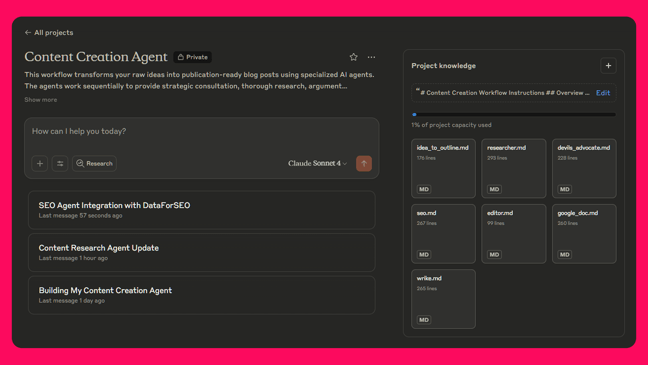
I outlined my plan, created markdown files for each step in the process (more on this later), and built the whole thing in under an hour by simply talking through my process.
For this workflow, I used Claude combined with Zapier MCP tools for automation. But the special sauce isn't the tools - it’s stepping back to think through the process before jumping into prompting.
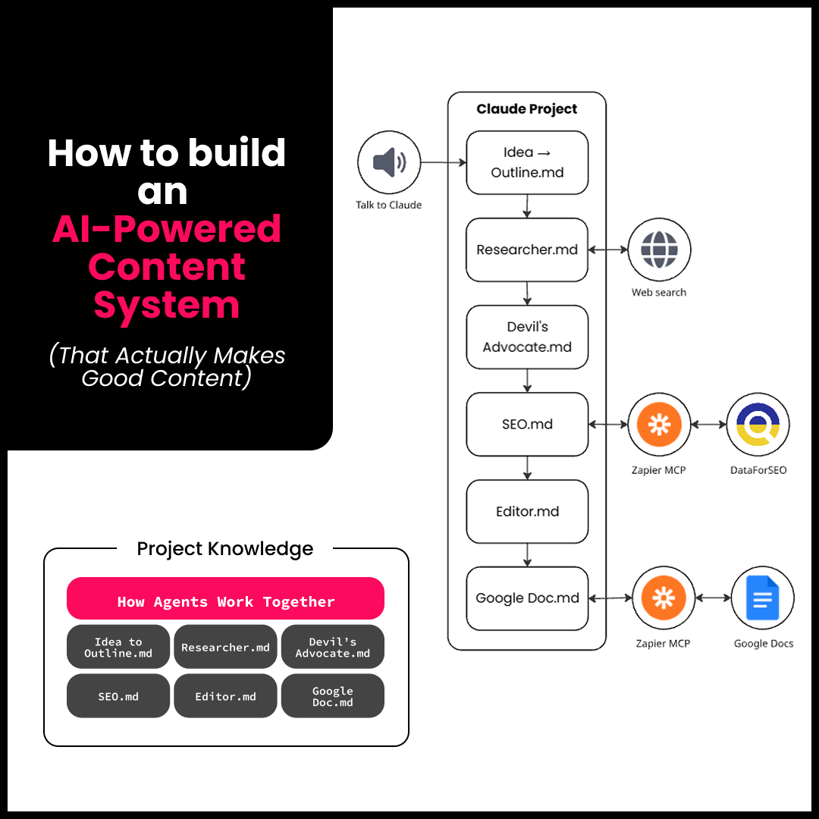
To help, I built six agents - but don’t let that scare you! In this example, “agents” are just markdown files with personas and clear instructions. They give the LMM specific jobs to do; they’re not fully autonomous systems. You don’t need to be overly technical, you just need to be systematic.
Here are the agents I built:
- Idea → Outline: To structure my stream-of-conscious style dictation into an article format
- Researcher: To gather up facts, find supporting data, and create well-researched rough drafts
- Devil's Advocate: To find weak points so I can make adjustments or strengthen my positioning
- SEO: To perform keyword research and recommend search terms to target
- Editor: To write in my voice and optimize content using target keywords
- Google Doc: To create a new Google doc from my template and add the content into the doc
.png?width=782&height=440&name=6-Agent%20%20Collaborative%20%20Content%20Creator%20Network%20(1).png)
Why Multiple Agents Instead of One?
You know that feeling when you ask ChatGPT to "write a comprehensive blog post" and get back something that's technically correct but feels generic and misses half the nuance you wanted? That's the single-agent trap.
I chose specialization over generalization for the same reason companies have different departments. You wouldn't ask your marketing team to handle accounting, right? Each agent has one job and does it really well.
I built my “Devil's Advocate” agent because I have opinions. A lot of them. Often I'm thinking about a specific audience or use case, so this agent pokes holes in my arguments and keeps me honest.
For example, when I was writing a post about AI tools recently, it flagged: "An engineer could handle large data processing by adding compute through cloud functions - but you're writing for non-technical marketers who don’t know how to do that. Are you being clear about the limitations for your actual audience vs the tool?"
This catches problems before publication instead of after.
Why You Should Be Doing This, Like Yesterday
The goal isn’t to replace your creativity. That’s likely one of your biggest strengths. Give yourself more time to focus on what you do best by systematizing the repetitive parts.
💡 You already know how to think through workflows, even if you don’t realize it. You break down tasks at work all the time. This is just applying that same thinking to AI tools. And if you need help breaking down your process, guess what? AI can help with that, too. Just talk through how you currently work and AI can help you identify the steps and bottlenecks.
Systems thinking wins because you can build AI systems that behave more like a team with clear roles rather than fighting with a single overwhelmed assistant.
- Each step has a clear purpose and success criteria
- Human checkpoints ensure quality control
- It’s a repeatable process that improves over time
Now that I’ve told you what I built and why I built it, you’re probably wondering, “How can I do this too?!” Don’t worry. I’ve got your back.
How I Actually Built The System
The real work happened before I wrote any prompts.
I talked about my process with Claude. I had it build a workflow for me to review, then I thought of more steps, it made adjustments, I thought of other nuances, it made more adjustments. After I had the workflow (which outlined the agents) we worked on the .md file for each, then the instructions to orchestrate them.
The process looks like this:
- Map your current workflow: I talked it out with Claude rather than trying to figure it out alone
- Identify bottlenecks: Think about where you procrastinate and where you find yourself making mistakes
- Define handoff points: Consider what decisions need human judgment vs. what can be automated
- Create specialized roles: Give each agent gets one clear job with specific success criteria
The key was breaking down my content creation into steps where I either added unique value or where I consistently got stuck.
- I'm great at: Generating ideas, strategic thinking, hot takes, turning unstructured processes into solid workflows
- I'm slow at: The actual writing process - tweaking sentences for flow, restructuring paragraphs and sections, getting the tone just right
- I hate doing: Citation formatting, meta descriptions
So I designed agents to handle the tasks I’m not good at while keeping me involved in the strategic decisions.
What This Looks Like in Practice
Step 1: Idea → Outline
I usually start with stream-of-consciousness thoughts (often talking directly into Claude's mobile app). This agent takes my roundabout way of thinking and adds some structure. It also helps me make sure I’m not talking about too many concepts or targeting multiple audiences in a single piece of content.
Step 2: Human Review
I check the outline before we move onto the next step.
[TIP] Be explicit during review steps that there must be approval. Don't let your agents assume approval and jump ahead - you want control over the process at each step or you might need to start at the beginning.
Step 3: Research & Rough Draft
The Researcher finds current data, verifies claims, and adds supporting examples, then creates a rough draft. 85% of marketers use AI tools for content creation (it found that stat automatically).
Step 4: Another Review by Another Human (Me)
Another quick review before moving onto the next step.
Step 5: Strengthen Arguments
Devil's Advocate finds counterarguments and weak points. For this post, it flagged: "People might say this is overengineering - how do you prove the time savings justify the time to set it up?"
Step 6: Target Keywords
Extracts topics from the blog post content and uses DataForSEO’s get_keyword_suggestions Zapier MCP tool for search term recommendations.
Step 7: Add My Voice
The Editor writes everything in my tone & style (referencing blog posts I’ve written in the past), targeting the keywords we ID’d in the previous step, and then creates the meta description.
Step 8: Yes, Another Review (Me Again)
One last review and opportunity for revisions before writing the content to a Google doc.
Step 9: Automate Writing to Template
The Google Doc agent creates a new Google doc, adds new content that we created in the previous steps, and formats everything based on my template so that it’s ready for review by the marketing team.
Creating the content creator itself took me under an hour, and then I used my process of creating the agent as the inspiration for this post to test it out. It took minutes from idea to polished draft.
When 36% of marketers who use AI say they spend less than one hour writing a long-form blog post - here is how you get there.
Here’s How You Can Get Started
The technical setup is easier than you think. Even if creating markdown docs and stringing together AI agents is new territory for you, you’ll be able to stand up one of these systems in no time.
What you need:
- Claude Pro, ChatGPT Plus, or similar
- A few minutes to set up your markdown files by talking through your process
Yes, Claude Pro or ChatGPT Plus account costs about $20/month, but if this system saves you even 2 hours of content creation time, it pays for itself pretty fast.
If you walk away from this blog post thinking “I have to buy Claude!” when you already have ChatGPT Plus or similar then you’ve entirely missed the point and are getting stuck on a tool instead of the problem.
You can take this approach and make it work with many different tools.
Optional (but can save more time):
- Zapier MCP or similar to seamlessly connect your LLM to other tools
Step 1: Create Your Claude Project
Go to Claude, create a new Project, and follow these instructions to set it up.
Step 2: Create Your Workflow
Create a new chat and just talk through your goal - creating a workflow to outline the major steps you take when writing content so that you can create separate agents via markdown files to automate your process.
Step 3: Write Your Agent Instructions
Create markdown files for each agent. Each file should define the agent's role, process, and communication style.
💡 You don’t need to write markdown files yourself - ask Claude, ChatGPT, etc. to help you! And if you’re still having trouble there or want something to get you started, upload this markdown file into an LLM to kick off your process.

🚧 Note: This isn't a plug and play .md, it's designed to consult with you to build what you need. Try it and let me know how it works for you!
Step 4: Connect Tools (Optional)
Zapier MCP integrates directly with Claude, and you don't need technical skills to set it up. I’m using it to get keywords to target from DataForSEO and create a copy of our company’s blog template from Google Docs and paste my content into the template.
You could easily create a content writer without any of these tools at all - only markdown files for instructions - and still get a lot of value and time savings!
Step 5: Create Master Instructions
Write one file that explains how all the agents work together - like a workflow diagram in text form.
# Content Creation Workflow

## Overview This workflow transforms raw ideas into publication-ready [CONTENT_TYPE] using specialized modular agents.

## How to Start Share your idea in any format: rough thoughts, audio notes, problem to solve, etc.

---

## The 4-Stage Workflow

### Stage 1: Idea Development **🎯 STRATEGIC PLANNING**
- Follow all instructions in `idea_to_outline.md`
- Apply audience targeting methodology specified
- Use strategic questioning approach from guidelines
- **⚠️ CHECKPOINT:** Must approve outline before proceeding

### Stage 2: Content Research **📚 RESEARCH & DEVELOPMENT**
- Follow all instructions in `research_standards.md`
- MANDATORY: Apply content development methodology specified - Use research approach from guidelines
- **⚠️ CHECKPOINT:** Must approve research before proceeding

### Stage 3: Brand Alignment **✍️ VOICE & STYLE APPLICATION** - Follow all instructions in `brand_requirements.md`
- Apply tone guidelines and writing standards specified
- Use voice examples and forbidden phrases list
- Reference `devils_advocate.md` for argument strengthening
- **⚠️ CHECKPOINT:** Must approve draft before proceeding

### Stage 4: Final Review **🔍 QUALITY CONTROL**
- Follow all instructions in `approval_workflow.md`
- Apply final checklist and publishing standards
- Complete handoff procedures as specified

BEFORE STARTING EACH STAGE: Review the corresponding .md file to ensure full compliance with detailed instructions.
Main Workflow Instructions

├── References: idea_to_outline.md

├── References: brand_requirements.md

├── References: devils_advocate.md

├── References: fact_checking.md

└── References: approval_workflow.md
And… That’s It?
Yes, that’s it. The tools are already there. You just need to think like a systems designer instead of a prompt engineer.
And if you’re someone who dreads writing blog posts but refuses to churn out another flavorless slab of AI slop, this kind of system might actually make the process enjoyable again.
So, now that you know there is a way to harness the speed of AI for content while keeping your thoughts, creativity, and voice on full display… what are you going to do about it?

.png)
.png)