
Archive for the ‘social media’ Category

What Can Social Media Do For You?

Tuesday, January 31st, 2012

The SEO team here at SEER Interactive was proud to host our first #SEERQandA session via our Google+ page this past Wednesday, January 25th. What resulted was an hour full of rapid-fire SEO questions and answers from users all over the world interested in learning more about our industry and company. Read below for some of our top questions and answers on best practices for SEO, the SEO culture in a small business, and site audits! For the full thread, please view it here!

————————————————————

Ed Fry  -  Two burning questions about SEO for online marketplaces where users are creating listings where users buy and sell products. So here goes:

1. When a listing expires (e.g. product runs out permanently) should you 301 or rel-canonical, and point the result to either the users profile or back to a category page (the one you want to rank) based on link juice, optimal user experience and appeasing Matt Cutts. :]

2. How do you try and rank for competitive terms if you’re a marketplace and you’d really like to rank in one country where you have lots of users (e.g. the UK) without ranking in another country where you don’t have as many users (for instance, you haven’t got critical mass of sellers in the USA, and the USA is really several different markets – East Coast vs. West Coast if the product is really local). And no, we don’t have the budget or resources for the multiple TLD’s and hustling across every country :( Any advice?!?

Wil Reynolds  -  +Ed Fry thanks for coming out and supporting us…You are asking the tough questions. So here is my take… I am a bigger fan of 301′s than anything just because they are tried and true. +Rand Fishkin has done more research than I have on how they pass juice. The one thing I wonder about is how does 301′ing vs canonicaling impact social signals for a product (I know that 301′s don’t pass vote value) but let’s say that as Google starts using Google +1′s to value pages, then I bet you a canonical is better because you keep the social voting juice and push the link juice as well. I think as long as the 301 is on topic our buddy Matt Cutts would be OK with it. That is a great question, cc: +Mike Essex +Dana Lookadoo

————————————————————

Andrew Dunkle  -  Do you guys have any advice for developing an effective SEO culture in a small business? We have a team of 8 and I’m looking for ways to get everyone involved in the process so important SEO related decisions are understood by everyone. Thanks!

Adam Melson  -  +Andrew Dunkle Love this question. It’s totally important to get this across your developers, PR person, President, etc. Everyone has to get on the same page as to why SEO is important and what you’re working toward. This can be shown to the web devs by showing them the impact of a page that was optimized. It helps get more conversions & doesn’t have to take forever. The PR person can start linking in releases and they’ll also be tracking who picks up the release and might have a contact at that website to get links in there if they were taken out during distribution. Copywriters can be briefed on different keywords they will want to include in their copy so that their articles/blog posts/pages get more visibility. The ego stroke is always a great route and if their content gets more eyes, your company gets more eyes. If there are 2-3 big keywords that you know are your money makers, share these as a goal with the team. Share that it’s important to have them rank. Maybe show how these keywords convert in PPC and the actual value of a sale. If you can save the cost of paying per click, it makes the company stronger, job security stronger, but more importantly it shows people that what they’re doing for SEO contributes to the bottom line of a company. If people are having trouble understanding why SEO goals are important, everyone can relate to dollars. “We need to get this SEO recommendation implemented because it could get us moved from #5 to #4″ isn’t motivating. “We need to get this SEO recommendation implemented because if we move from #5 to #4, it could bring in another $10k over the course of the year. Do you have an hour to implement?” is much more motivating.

————————————————————

Cleo Kirkland  -  Hi all, What’s your process for a technical site audit? What are the top 10 errors you look for, how do you find them, and what tools do you use? I come from a link building and copywriting background, so trouble shooting site indexation issues is a bit foreign to me. Thanks!

Rachael Gerson  -  +Cleo Kirkland We have some basic starting processes, but every site ends up being different, so part of the plan needs to be flexibility. We may start an audit only to find there’s an issue with this particular site that we haven’t seen in hundreds of sites previously.
Some basic things to look for:
* Is the site content spiderable to the search engines? Try spider simulators like http://www.webconfs.com/search-engine-spider-simulator.php.
* Is the navigation spiderable? The Web Developer Toolbar (https://addons.mozilla.org/en-US/firefox/addon/web-developer/) is an absolute favorite. Get it for Firefox and Chrome, b/c Chrome is missing the ability to disable JavaScript. Do basic things like checking out Google’s text-only cache of a page. 
* Do you have redirect issues on the site? We had a client previously on a platform that 302 redirected every single link on the site to another URL. Since 302 redirects tell the search engines the redirects were temporary, the actual pages weren’t being picked up. The platform couldn’t be edited. If the site was/is redesigned, make sure there’s a redirect strategy in place. My favorite redirect checker is http://gsitecrawler.com/tools/Server-Status.aspx.
* Using the same tool, check to make sure that either http://domain.com 301 redirects to http://www.domain.com, or vice versa.
* Make sure 404 pages actually return a 404 server status. 
* Go through Google Webmaster Tools. Find the errors, figure out how to resolve.
* Review the robots.txt. Are pages being blocked that shouldn’t be? This can be a huge issue!
* Are there duplicate pages/domains/subdomains? Would a multi-faceted navigation make more sense for the site? 
* Do they have basic things like HTML & XML sitemaps? 
* Check for pagination issues, mistakes with canonical tags, etc.

Pausing my response here b/c just got a note that you were already answered… :)

————————————————————

Now what does this all mean?

Besides the 100+ comments we received and an admirable attempt at justifying having a Google+ page, what we noticed more was the increase in our overall social media following. Here at SEER, I help manage the many social media accounts we have and find myself always looking for innovative ways to increase our fans and followers. We know that as a company, we have extremely valuable insight in both the SEO and PPC worlds, and we want people to know our thoughts and opinions! Hosting this G+ Q&A gave us exactly the push that we were looking for! Using our lunch break on a Wednesday afternoon, we were able to boost our name virally for an all-time high of 63 mentions and gain over 1% more followers (and beat our competitor’s follower growth that day)! Using SEOmoz’s Social Dashboard (which I highly recommend), the below two graphs highlight my exact enthusiasm (SEER is represented as the green line in the Follower Growth graph and competitors are represented as the red, blue and purple lines, respectively).

Interactions from the past 30 Days


Follower Growth from the past 30 days

In Conclusion

Now, looking back, I see that our first Q&A session was a huge success. We were able to inspire people with our knowledge and our creativity using Google+, all while enabling new benchmarks for our future social media efforts. My simple and quick words of advice for other small (or large) businesses that are trying to actively increase their presence online is to be provide knowledge or actionable items for your users, think of creative ways to invite and include your audience and have fun! I hope to continue learning more about social media and implementing new trends for SEER, but as for now, stay tuned for our next #SEERQandA session coming up in early February! We’ll be switching things up with SEO and PPC-themed discussions, so bring out your best questions and let’s rock and roll.

I’d love to hear about your social media successes and failures! Follow me @Melissa_Alam and fill me in!

How Google is Making Your Favorite Brands Market for Them

Thursday, January 19th, 2012

Hello SEO’s, PPC’ers, Digital Marketers, and Internet Enthusiasts –

Remember when Facebook started? I do. I was still on MySpace and in high school – I couldn’t wait to get my college .edu so I could get an account. They made people wait, and slowly opened the social network to more and more people to create demand. First Harvard, then ivy leagues, then top colleges, then all colleges, ect ect… You can contribute some of Facebook’s success to starting out and limiting users. Once you tell people they can’t have something they just want it more. Then fast forward 5 years and Google wanted to get into the social media game. I remember Google announcing it and I was so pumped to get one, and then I did a week later… and so did everyone else. And then after checking it out, people moved back to Facebook.

But Google is now pushing it on to us whether we like it and with help from our favorite brands and celebrities. You might have noticed a new thing in Google this week. On the right hand side of the SERPs above the ads is now some pretty…pretty…pretttty good real estate. There’s box that will show you the top Google+ results. However these results aren’t placed there because of some fancy algorithm they are there for other reasons which I will explain in this blog post.

Google+ is making your brands advertise for them

The new episode of “This Week in Tech” was one of my favorites of all time – they talked very extensively about “Google plus your world” and had some awesome examples that got me thinking about Google alternative motives. The first example was when they searched for “Cars” and got this:


Wow, Ferrari and BMW are both displayed at the top of the first page for such a competitive keyword? I don’t have them in my circles and I don’t talk about them on Google+ (I’m more of an off road truck kind of guy) so why are they there? They are there because they are car companies that have the most followers. (At time of writing General Motors is in 2,532 circles and Ford Motor Company is in 4,266 circles.)

So then my marketing degree kicked in, and it sparked, I think I know what they are doing! They are making companies start advertising their Google+ pages and thus advertising Google+!

Ok so how did I get to that conclusion? Let’s backtrack here, Ford and GM are definitely some of the automobile industry dominators who are usually on top of their marketing game, so once this comes on their radar they are going to want to beat Ferrari and BMW out of their spots in order to show up on the first page.

But how will they do that?

By getting people to add them to their circles on Google+.

And how do they get people to add them to their circles?

The same way people get Facebook likes – marketing campaigns. Give the public a reason to “like” them/ add them to your circles. So that could be giveaways, deals, exclusive offers, and concept cars pictures. Just cool stuff that we want to see and get that we can’t anywhere else.

So let’s say Ford and GM start dumping all this money into their Google + pages.

But they think, if no one is following us on Google+ how do we get the word out?

Advertise these exclusive offers on their Google+ page on their website and across their competing social networks! (The Ford Facebook fan sites have over 6 million fans across their different pages and General Motors has over 3 million across theirs).

In summary, by having these exclusive offers, to get followers, in order to have their company name show up on the top of page for the search term “Cars” (that is searched locally 45,000,000 times a month), they have to also promote Google+ itself, and get their fans, follows, and visitors of their far greater networks to sign up for Google+. And the more people that sign up the more information about you Google gets! Genius!

Google+ gets celebrity endorsements

Here’s another example from Danny Sullivan’s post on Search Engine Land. Just like the Cars search term showing the Google+ pages for Ferrari and BMW it shows the same for “music” and “movies”. Here’s what it looks like for those search terms:


Just like your favorite car company’s celebrities are singers and pop stars are brands, and their management team market them like a brand. The more they are in the public eye the more famous they are. So I think that you will see a lot more celebrities start showing up in Google+ thus more people joining Google+ to follow them. In fact, Lady Gaga who has the largest twitter following and over 46million Facebook fans did not have a Google+ page last week until Sunday when she created one. Did she start a Google+ page just to be more in touch with her fans? I think NOT! She wants to beat out Britney and Snoop for that spot. And she is doing just what Google wants her to do, advertising Google+ on her other networks and basically telling her fans and followers “Hey, I’m on Google+ you should come join me, if I [Lady Gaga] am on it, it must be cool!”


Just wait, I am predicting a sudden shift in Google+ users because there is going to a fight for those top when entertainment key words are used.

But what does this mean for SEO?

First it means that you better have a Google+ page and start thinking about it more and more. You are going to need it, if you want to achieve page one domination in the future. Also the Google+ accounts that show up on the right hand side, as far as I can see, are only based on the amount of circles you are in. Personally I think that’s a little messed up, and contradictory to Google’s algorithm for search results. They have over 200 factors to rank sites organically and even have a complex formula for the ad rank quality score (thanks for the ppc info Aaron!). But for top of the page real estate it’s only the amount of circles you are in? C’mon Google, your better than that. I tried the searches logged in and out of Google+ and even tried it in incognito mode and got the pretty much the same results. If you refresh the page a couple times you will see some other accounts but they are still the top people in the Google+ field and not ranked on relevance. Another test I did was I logged into Google+ and added both Ford and GM to my Circles and refreshed the “car” SERPs and still got Ferrari and BMW. I even tried a branded search for Cyangenmod (the brand name) the community based firmware for Android and it didn’t even rank 1st for its own Google+ page.


Ya, its #2 but when I refresh it doesn’t even show up – for a branded search?! (And look at the organic results, why is their Google+ page showing up ahead of their Wikipedia page? I can bet that the wiki page gets a lot more traffic and has a lot more links then its G+ page. But organic social results are a whole other story for another post.)

What do you do you think about the new Google+ integration have you noticed anything funny or odd about the accounts that show up for different search terms? Do you like the changes in social search? If so, please share your thoughts and ideas in the comments box. And don’t forget to follow me on twitter.

The Past Three and a Half Years Were Crap

Wednesday, December 21st, 2011


Hi, my name is Chrissy and I am an SEO neophyte!

Since you haven’t seen me in this space before I’ll go ahead and give you a rundown of how I got here. I worked in PR, Marketing and Social Media.  Anyways, I thought the next natural progression would be SEO. Well, nothing about this progression was natural or even remotely fluid. Everything I had learned up to this point (three and a half years) equated to nothing more than a big pile of crap! Yep, that’s right, it was crap!

So, what is it that I now deem to be crap and what have I learned in the last month? Here’s a small sampling of what I have learned to be true:

My hope is that some of these initial lessons help other SEO neophytes who are transitioning from PR, Marketing or similar industries.

4 Tips on Improving Your Blogger Outreach Message

Thursday, November 10th, 2011

Training a newbie for what I like to call the “SEO outreach game” can be quite the daunting task. (Hey, hate the game, not the playa!) Can you trust that the trainee will actually deliver quality results? Will the newbie understand the overall mission of the campaign? What type of writing style does your trainee have and can you train him/her to fit the persona you need for your outreach? Keep in mind that as the trainer, you need to be able to foresee any mistakes or inconsistencies that might occur that could potentially deter you and your client from getting the actual response rate you need.

So newbies, this blog post is dedicated to you and all of your hard work, countless hours and mind-numbing emailing you’ll spend on blogger outreach. I’ve been in your position, I still am in your position, and I’ve noticed some key mistakes that can easily be fixed. Keep in mind the following tips and tricks below, and you’ll get those positive responses in your inbox in no time!

1) Addressing your blogger: Most bloggers have their name and email address loud and clear on their blog. For those more, anonymous bloggers, make sure to first check their social media accounts (especially Twitter and Facebook) for their names and emails. You’d be surprised by the number of times I found the info I needed in their Twitter bio or Facebook info section, rather than on their blog. Another location to check for a name is in the actual post! Lots of bloggers sign their posts with their names or have it automatically set up to post the author name (aka their name!).

Oh hello there Cecily Kellogg!

2) Hi…: The search for a blogger’s name and/or email should only last about a minute- any longer and you’re wasting your time because they’re probably anonymous for a reason. What you can do in these rare cases is to address the email with a simple “Good afternoon!” Adding in their blog name such as, “Good Afternoon SEER Blog!” is much more inviting and cheery than a generic “Hello” or “Hi.”

3) Be outrageously enthusiastic: I’m talking about adding those pesky, little exclamation points every 2-3 sentences and including adjectives and adverbs like “great, adorable, extremely, absolutely.” If it helps to think of yourself as Cher from 1995’s cult classic, Clueless, then so be it! Be genuine, but also be eager, cheerful, bouncy, chirpy, perky, etc.! This may take a little out-of-the box thinking when it comes to scanning their site and complimenting a blogger, but it is definitely worth it on the blogger side. Everyone loves a little ego boost, so as an SEO, be confident and sincere and learn the art of schmoozing.

Here’s an example:
– “Hello blogger, we were inspired by your blog on your life.” = NO
– “Hello Melissa, we were really inspired by your awesome blog posts on your adorable kids and great DIY projects!” = YES
(Remember, a good compliment is always nice, but a great compliment will be your guiding light to a higher success rate!)

"I like, totally, love her blog, but like, I can't figure out how to, like, compliment her without sounding so, like fake."

4) Attachments: If you’re using Gmail for your outreach and plan on attaching documents or images with your email, make sure that you don’t forget to attach your file! I’ve seen so many instances where I’ve forgotten to attach an image, only to waste time replying, apologizing and re-attaching the original image. For newbies, it might be best to start out by creating drafts of all your emails before you send them out. By going to your Settings – Labs – and enabling the “Move Icon Column” lab, you will easily see the paper clip icon to the left of the subject line of your emails before sending them out. This is a quick, easy fix to any potential annoying follow-up emails.

In Summary: Remember that the bloggers you address are still human (well I hope so, at least) and get pitched by advertisers and marketers multiple times a day. Set yourself apart by being honest, straight to the fact and quick to respond to all future lines of communication. Writing an effective outreach message isn’t always easy, but hopefully these few tips above will make your life easier and less prone to mistake! I hope to build more quick little tips as I continue in this “SEO outreach game,” so stay tuned for a Part 2 of this blog post!

Tell me all about your own outreach successes and fails via my Twitter at @jogamel88! :)

Was More Personalized Search Google's latest trick or treat?

Thursday, November 10th, 2011

In addition to some awesome carved pumpkins, Google gave users and advertisers another Halloween treat this year- Why These Ads. Why These Ads, is Google’s latest attempt (and perhaps a dig at Facebook) to give users a more personalized search experience. These links, which appear above top and side results, give users the option to control their search experience by opting out and blocking advertisements.

Upon clicking Why These Ads, users are given a few options. Below I’ve given a quick explanation of the available options:

1. Block- If a user chooses to block an advertiser, they are not shown any ads from that advertiser or any other ads which link to that website. As of now, users are eligible to block up to 500 advertisers total.

2. Opt Out- If a user chooses to Opt Out of advertisements, Google no longer uses additional information (demographics, location, past searches, etc.) to personalize that user’s search. (These options can be set at a campaign and browser level) Users can still be shown ads, however, the targeting might not be as precise. Additionally, if a user chooses this option they lose the ability to block specific advertisers.
Now, that we have an understanding of what these options are, I want to discuss what effects these Opt Outs & Blocks could have.

Now, that we have an understanding of what these options are, I want to discuss what effects these Opt Outs & Blocks could have.

Blocks

I think it is a given that no one likes to be blocked. While advertisers won’t know who blocked them, it doesn’t seem fair that if blocked, there is nothing advertisers can do outside of creating a whole new account on a whole new website, if they hope to reach that user again. In addition to this, there is something else that bothers me about user blocking, and it relates back to my good old friend, Session Based Matches.

As you may have noticed in my rant on Session based matches, I don’t think Google is always the best at personalizing. I mean if you’re showing me a sales training ad, when I searched for eye exercises, I’m going to be annoyed as both a user and an advertiser. Maybe even to the point, where I’d contemplate blocking the sales training ad. However, what happens if later on down the road, I am looking for sales training, and because I blocked that advertiser, I might be missing out on something great. Sure I could unblock that advertiser, but will I remember how to do that?

Additionally, as noted in Google’s explanation of Blocked advertisers- the particular ad blocked and any additional ad that blocks to that site will no longer appear in Gmail or Google Search. So if I block the-art-institutes.info because I found their cooking class to be irrelevant, am I also blocking their media arts, fashion classes ads which are mentioned on the same landing page domain? What if this would have been a relevant site for a “fashion class” search?

I’m sure these aren’t the only possible issues with User Blocking, but these two stood out to me. Thankfully though, there is one positive, Google confirmed that the number of blocks will not affect Ad Rank or Quality Score which let’s face it, is pretty necessary. Otherwise, advertisers would just attack their competitors with blocks.

Opt Out

When it comes to opting out, I’m torn. Sometimes, I wish Google wouldn’t try to personalize my searches. However, sometimes I love that it does. My ideal wish would be that instead of implementing this and that, Google would just work on improving it. Maybe if Google showed me eye exercise ads instead of sales training ads when my query was eye exercises, I wouldn’t be so anti Google’s personal touch.

Initial Findings

Well now that I’ve gone on another rant, I also wanted to share some initial findings. In Wired’s blog, they mention-”Out of every 15 users who get to the ad preference manager, 10 do nothing, 4 edit specific preferences, and only 1 opts out of behavioral targeting entirely”. So while it hasn’t had a huge impact in its 4 live days, I definitely think this is something to keep on your radar.

Why These Ads & SEO?

To conclude this post, I wanted to touch on how this change relates to SEO. So if a user blocks a PPC domain it is not blocked from organic search engine result pages (SERPs), but there are certain similar things that Google has rolled to improve the user experience when navigating the organic results. In order to shed some light on these things I’ve called upon my co-worker, and SEER SEO team member, Abbott Shea.

Hello! For my SEO cameo I’m going to go over some of the things that Google has rolled out in the past year that affect us SEOs.

Block All

Firstly, a feature that Google introduced along with their Panda Update, which was rolled out earlier this year, is the ability for a user to block a domain entirely from the organic search results. When someone clicks on a result for a certain search query and then clicks back to the SERPs they have the ability to block the domain that they just clicked through to. To show this in action I did a search for “car rentals”.

You see? So I clicked through on the National Car result and clicked back, and now I have the ability to block all results from nationalcar.com in my future searches – insert evil laugh here.

Now I wouldn’t do that, because National Car seems like a legitimate resource and I’m sure they have all the answers for all my “car rentals” questions. But there are sites out there that have manipulated Google and fooled them into listing their site at the top of the results for a certain keyword without actually offering any helpful content for the user searching that particular phrase. Like this result that showed up in the second spot for “loans for seniors”, and wouldn’t answer any of the tough questions a senior citizen looking for loans would need answered.

Google Plus

One other thing that Google has done is serve up content that has been shared by people in my Google + circles or written by people in lots of Google + circles, something like 600 or more, higher up in the SERPs and with a nice photo of that person. For instance, it seems that my friends Adam and Wil have shared some articles about “link building”…

… and “wil Reynolds”. I did have to cheat a bit with my query in order to show you exactly what I was talking about, but that’s because I have only very modest sized circles (cue the violins, maestro!). The point is the same – Google is serving up relevant content that your friends/connections have showed interest in assuming that you will be interested in it too.

Really it’s not a bad assumption. This is a very brief overview of the feature, but you can find out more in Wil’s article on Google + and Rankings.

(Not Provided)

Lastly, Google has recently rolled out a feature that doesn’t change what the user sees, but does affect SEOs. They have started protecting a user’s information by grouping users that are logged into their Google accounts under the “(not provided)” umbrella in Google Analytics. This means that for a user that is logged into their Google account (Gmail, Google +, etc.) and visits our site through the organic search results, it makes it nearly impossible for us to see what KW that visitor came in on.

This drive us SEOs nuts… and then Rachael Gerson comes along and puts at ease. To see how Rachael turns impossible into nearly impossible check out her article on Not Provided in Analytics.

What are your thoughts on Google’s latest “treats”? We would love to hear your thoughts, please share below and follow Abbott and me on Twitter!

LinkedIn Launches Free Lead Collection Feature

Thursday, November 3rd, 2011

I have previously outlined why and how LinkedIn can be a great advertising platform for you B2B PPC strategy (here and here)

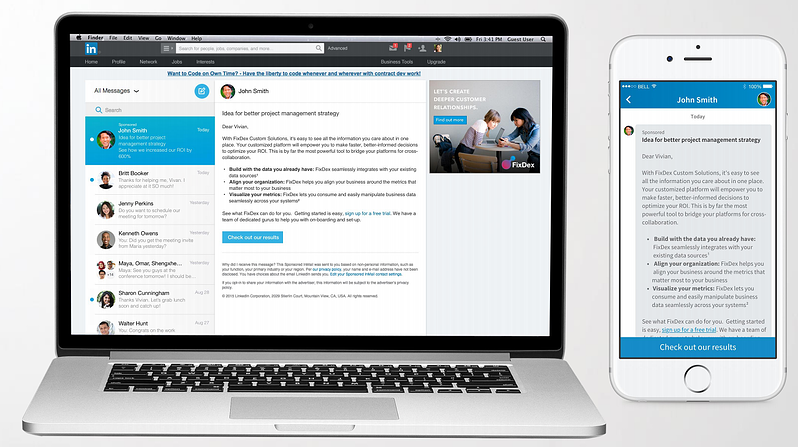
And now they have added another wonderful, FREE feature called Lead Collection for advertisers who are running LinkedIn ads. This new feature gives users that click to your site an easy way to contact your company by showing a “Request Contact” button above your website.

How it works

When a user clicks on your LinkedIn ad and is directed to your website, they will see a lead collection bar above your site which gives the user the option to be contacted by your company.

For each lead you will receive the member’s name, headline and a link to their LinkedIn Profile. LinkedIn members have the option of sharing their email address as well. You will receive this information via email to either the email address associated with a personal account, or the contact associated with the Business Account.

You can also view your leads in the Ads Dashboard under the leads tab. Here you can filter out leads by time frame, contact status and you can even see which campaign the lead came from.

You will also see a Lead count in the Ads Dashboard in the Ad Campaign Tab.

How Do I Set This Up?!!?

The great news – it’s very simple … so there is no excuse not to use this feature! (Did I mention, it’s FREE?)

All you have to do is go to your campaign settings and check “Yes” for the Collect Leads option:

No tracking or back-end coding needs to be set up as everything is tracked in the LinkedIn interface.

My 2 Cents

LinkedIn is still a relatively new player in the PPC space but this shows that they are making improvements to their product and offering more options for advertisers to connect with potential leads.

While you are most likely sending users to a landing page with some sort of contact form, it doesn’t hurt to give them as many options as possible to reach out to you! Especially when you can track the lead!

By collecting the leads via LinkedIn Lead Collection could also hold much more value to your sales team. For example: You are already (or should be) targeting users in your key demographic. The user resonated with your ad, clicked to your site and reached out to be contacted by you. You then have insta-access to their company information to determine if that lead actually holds value to you and whether or not it will be worth pursuing.

On the downside, this feature could get tricky if you are using a dummy account for your campaign (which I do not recommend via the tips section in my previous post, Using LinkedIn For Your B2B Strategy.

At this time, I am not exactly sure how contacting the leads will work as I have not set this up for a client yet (working on that), but I am assuming you will only be able to contact the lead directly via the account associated with the ad campaign. If you are using a dummy account you will need to be sure to check the email address associated with the account often as well as the campaign performance in the interface (which you should be checking daily!) to ensure you are following up with the lead in a timely manner. You may still be able to contact them as you choose since you will have the users information. You just won’t be able to see a breakdown of leads contacted vs. non-contacted in the leads tab of the LinkedIn interface.

This leads me to a few questions – Will this affect ad quality if users do not interact with the Request Contact button? Will LinkedIn remove the feature for companies that do not follow up with the leads properly? Will users interact with the button and find it helpful, or is it a bit creepy?

What are your thoughts? Will you test this new feature?

Follow me on Twitter!

Why Aren’t You Using Twitter To Build Links?

Tuesday, October 25th, 2011

Last week I was using Google to find blogs that accept guest posts in the small business space — using advanced queries like, “guest post” OR “guest author” AND inurl:blog OR inurl:business. At first glance, the results looked fantastic. However, most of them were low quality and not worth pursuing.

The gears started turning and, on an off chance, I turned to Twitter. It seems every SEO blog and every conference has someone talking about using Twitter to get links. In my experience, most Twitter linking strategies are long-term, such as:

  • create a top influencer list on your blog and Tweet it out to see if they’ll mention you
  • find people that want something and reach out to make a connection
  • create content to answer questions on Twitter

Rand Fishkin, from SEOMoz, has a great video on 8 ways to build links using Twitter, which you can find here. All great strategies, but I want to take another spin on using Twitter to get links — using Twitter Search.

For years I’ve been using advanced search queries in Google to find linking opportunities and guess what? Twitter also supports advanced search queries. Find the complete list here. Some of you out there might already be wise to advanced search queries on Twitter but for those of you that are not, here is how you can leverage Twitter for guest posts, contests and other linking strategies:

Guest Posts

Finding Guest Posts

Twitter Search query: “guest post” OR “guest author” “[industry]” filter:links

This search query will bring back Tweets that contain “guest post” or “guest author,” the industry keyword (e.g. travel, education, auto, etc) and links.

If you’re not finding a lot of opportunities, open the search to something like, “guest” “[industry]” or if there are irrelevant results, use the “-” sign to eliminate tweets with irrelevant keywords.

Here is an example you can use for the travel industry:

“guest post” OR “guest author” “travel” filter:links

After performing the query, in about 10 seconds, I stumble onto Alexis Grant, who’s written a fantastic guest post about travel. The site she’s done a guest post on could be a great place for me to reach out to for a guest blog.

If you’re thinking, “the travel industry has a ton of guest post opportunities but my industry is so niche no one does guest blog posts…” think bigger. Let’s say you sell homemade throw pillows (pretty specific, right?), search for “crafts,” “home goods,” “furniture.” Looking at the big picture can help you find more bloggers that accept guest posts.

Finding Additional Opportunities

Some guest authors publish on multiple blogs which gives you an opportunity to find sites that accept guest posts that might not have popped up in your initial query.

Search query: @[guest writer’s Twitter handle] “guest post” OR “guest author” filter:links

Example: @alexisgrant “guest post” OR “guest author” filter:links

As you can see, @alexisgrant has been a guest author on more than one travel blog. If you want to dig even deeper, you can throw her website into Open Site Explorer, download the backlinks and put “guest” in the title and / or URL filter.

Finding Industry Topics

If you’re struggling to think of great content for your potential guest blogging prospect, use Tag Crowd to find longer tail / related terms. Copy all of the content on the Twitter results page and put it into the text box on tagcrowd.com.

These word clouds are going to change as frequently as the Tweets you use, so you can have fresh content when reaching out to bloggers.

Make Publishing Your Content Even More Appealing

If you want to make bloggers a more appealing offer (other than “here’s content, publish it!”), create a contest around the content. So you can say:

“I have 5 pieces of content and I’m reaching out to 10 sites to publish it. The first 5 bloggers to publish the content before [INSERT DATE] will receive [INSERT PRIZE].”

(Full disclosure: Big thanks to Wil for coming up with this idea!)

Stuck on what might be appealing? Use some of the themes from your Twitter search in Google Products to find prizes that might be appealing to them. So if we’re going with the travel industry, simply type travel into Google Product search and see what rises to the surface.

Google Product search can help you find cheap items that might be appealing under a certain price. I’m seeing products for different travel bloggers. Take a look:

We can give the traveling baby stroller to mommy travel bloggers and the Apple and router to other travel sites. Try doing a site:[domain name] [product] Google search to see if they’ve talked about the products in previous posts. This will help you build an even more compelling argument to publish your content.

Contests

Let’s say you’re running an iPad giveaway contest to get links. You can use Twitter advanced search queries to find other contests and see how they’re getting links:

“contest” OR “contestant” “[industry]” filter:links

Once you find a contest in your industry, use Open Site Explorer to find sites that are linking to the contest. Then you can reach out to those sites to see if they’d be willing to link to your contest.

If Open Site Explorer doesn’t have backlink data on the competitor’s contest URL, try:

  • the Google query: “[competitor brand name]” AND “contest.” OR, if the contest requires you to paste a snippet of code or phrase on your site to qualify, simply copy it and throw it in a Google search with quotes.
  • the Twitter query: “contest” OR “contestant” @[Twitter handle] filter:links until:[insert date (e.g. 2010-03-30)]

Answer Industry Questions

Find people that are asking questions in your industry by using the search operator “?” and your industry:

“?” “[industry]”

Then you can use RowFeeder to find those users that have websites. When you find a user that has a website, reach out to them and ask if you can do a guest post on their blog.

Find Local Linking Opportunities

If you’re trying to find local links, use the “near:” operator. So if I want to find local guest post opportunities for tourism in Philadelphia, I would use the query:

near:philadelphia “guest post” “travel” OR “tourism”

Don’t Drop This Idea After You Get a Handful of Links!

I used to be the biggest offender of this. I’d read a great blog post about a new way to get links, do it for a couple of weeks, then move onto the next shiny linkbuilding strategy. I did this until I made a habit of checking on almost all of my easy link strategies EVERY DAY. First thing in the morning, I wake up, grab some coffee and breakfast, sit down at my computer, check my client’s stats and then spend 30 mins finding quick linking opps in Google Reader, EVERY DAY.

I’ve used Google Reader’s Twitter Search functionality (browse for stuff > search > track keywords and searches > enter keyword > select Twitter > now subscribe) to track guest post, contest, directories and other basic linking strategies.

So that’s how I use Twitter to find linking opportunities. If anyone else has other ideas on using Twitter search to get links, please add them in the comments below.

Subscribe

Subscribe to our RSS Feed

Support

Get our Newsletter

Keep up-to-date search trends, latest blog posts and more.