
UPDATE:
(May 9, 2012) Added more here: More ImportXML Cookbooks
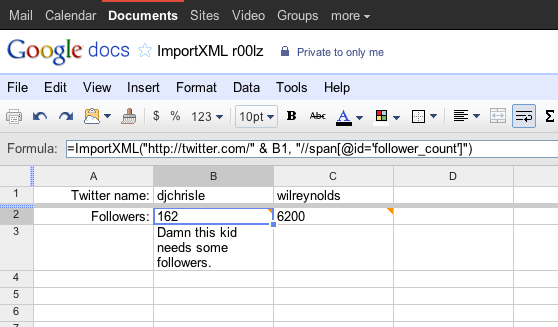
Here's a collection of ImportXML functions that I've collected over the past few months. Some of them I grabbed from other folks, others I've made myself.
This post won't introduce you to ImportXML. If you don't know what ImportXML is go read this EPIC post by the guys at Distilled: "The ImportXML Guide for Google Docs". If you do know how to use ImportXML then this will be a fun Sunday afternoon project!
Google Search
How to use:
Update 2/15/12: Google Scraper in Google Docs Update - Update to getting SERPs in Google Docs.
Update 2/14/12: Seems that Google changed how they display the results. I'm working with this formula right now. =ImportXML("https://www.google.com/search?q=test&num=10", "//cite")
Replace {KEYWORD} with the search term you're looking for. Example, if you want the search results for the keyword "philadelphia seo company" your formula should look like:
=ImportXML("https://www.google.com/search?q=philadelphia seo company&num=100", "//h3[@class='r']/a/@href")
Getting The Top 100 Search Result Links
=ImportXML("https://www.google.com/search?q={KEYWORD}&num=100", "//h3[@class='r']/a/@href")
Getting the Top 100 Search Result Titles
=ImportXML("https://www.google.com/search?q={KEYWORD}&num=100", "//h3")
Google Products
How to use:
Replace {KEYWORD} with the keyword your looking for.
Getting All The Product Names
=ImportXML("www.google.com/products?q={KEYWORD}", "//h3[@class='result-title']")
Getting The Product Descriptions
=ImportXML("www.google.com/products?q={KEYWORD}","//h3[@class='result-desc']")
Prices For a Given Product
=ImportXML("https://www.google.com/products?q={KEYWORD}","//span[@class='main-price']")
How to use:
Update 2/15/12: This doesn't work since they now changed their website. I haven't gotten around to figuring out a fix. If you have one I would love to know. Tweet me @djchrisle
Replace {SCREEN_NAME} with the target's Twitter name without the "@". Example, if the Twitter name you want to use is @djchrisle then your formula should be:
=ImportXML("https://twitter.com/djchrisle", "//span[@id='follower_count']")
Getting a Twitter Account's Follower Count
=ImportXML("https://twitter.com/{SCREEN_NAME}", "//span[@id='follower_count']")
Getting a Twitter Account's Following Count
=ImportXML("https://twitter.com/{SCREEN_NAME}", "//span[@id='following_count']")
Getting The Number Of Lists a Twitter Account Is On
=ImportXML("https://twitter.com/{SCREEN_NAME}", "//span[@id='lists_count']")
Getting The Number of Tweets An Account Has Made
=ImportXML("https://twitter.com/{SCREEN_NAME}", "//span[@id='update_count']")
Getting A Twitter Account's Last Tweet
=ImportXML("https://twitter.com/{SCREEN_NAME}", "string(//*[@class='entry-content'])")
How to use:
Replace {USERNAME} with the target person's username. It's usually the person's name without any spaces. You can try automatically removing spaces from a person's name by using the Dewhitespace() function found in the Helper Functions section. For example:
=ImportXML("www.linkedin.com/in/" & Dewhitespace({USERNAME}), "//dd[@class='overview-connections']/p/strong")
Getting the Number Of Connections
=ImportXML("www.linkedin.com/in/{USERNAME}", "//dd[@class='overview-connections']/p/strong")
Getting the Number Of Recommendations
=ImportXML("www.linkedin.com/in/{USERNAME}", "//dt[text()='Recommendations']/../dd/p/strong")
Getting a Person's Profile Summary
=ImportXML("www.linkedin.com/in/{USERNAME}", "string(//div[@id='profile-summary']/div[@class='content']/p)")
Finding the Locality of a Person
=ImportXML("www.linkedin.com/in/{USERNAME}", "//span[@class='locality']")
Finding the Industry a Person Defined Themselves In
=ImportXML("www.linkedin.com/in/{USERNAME}", "//span[@class='industry']")
Finding What the Person Wants to be Contacted For
=ImportXML("www.linkedin.com/in/{USERNAME}", "//div[@id='profile-contact']/div[@class='content']/div[@class='interested']/ul/li")
Getting a List Of This Person's Interest
=ImportXML("www.linkedin.com/in/{USERNAME}", "//div[@id='profile-additional']/div[@class='content']/dl/dd[@id='interests']/p")
Blekko
How to use:
Replace {URL} with the URL you're looking for.
Getting The Host Rank
=ImportXML("https://blekko.com/ws/{URL}"
Getting The Number Of Pages a Site Has
=ImportXML("https://blekko.com/ws/{URL}", "//div[@class='subMenu']/span[2]/a")
Getting The Number of Inbound Links
=ImportXML("https://blekko.com/ws/{URL}", "//a[@class='link']")
Getting Domains that Duplicate Content
=ImportXML("https://blekko.com/ws/{URL}", "//a[name='duplicate']../table/td/a")
Getting The Entire Crawl Stats Table
=importhtml("https://blekko.com/ws/{URL}", "table", 2)
Getting the SERPs
Note: The columns will come out in this order: Title, Link, GUID, and Site Description
=ImportXML("https://blekko.com/ws/{URL}/+/links+/rss")
Alexa
How to use:
Replace {URL} with the URL you want to get the traffic ranking from.
Getting the Global Traffic Rank
=ImportXML("https://www.alexa.com/search?q={URL}", "(//ul[@class='traffic-stats']/li/a[@href][1])[1]")
Getting the US Traffic Rank
=ImportXML("https://www.alexa.com/search?q={URL}", "substring-after(//ul[@class='traffic-stats']/li[2], ':')")
Getting the Number of Sites Linking In
=ImportXML("https://www.alexa.com/search?q={URL}", "substring-after(//ul[@class='traffic-stats']/li[3], ':')")
Getting a Site's Average Load Time
=ImportXML("https://www.alexa.com/siteinfo/{URL}#", "substring-before(substring-after(//span[@class='Average']/.., '('), 'Seconds')")
Getting the Summary of a Site's Audience Snapshot
=ImportXML("https://www.alexa.com/siteinfo/{URL}#", "string(//div[@id='trafficstats_div']/div[@class='content1 noborder'][3])")
Getting the Top Search Queries for a URL
=ImportXML("https://www.alexa.com/siteinfo/{URL}#", "//div[@id='trafficstats_div']/div[@class='content1 noborder'][4]/div/table/tr")
Websites
Getting the URLs from a website's Sitemap
=ImportXML("{http://www.domain.com}/sitemap.xml", "//url/loc")
Helper Functions
Remove spaces from something
You want to remove all the whitespaces from a string.
function Dewhitespace(str) { return str.replace(/s+/, ''); }
Formatting something for use in a URL
A term with spaces seems to be giving you trouble. Try using this function to change its format to a URL query string.
function URLEncode(str) { return encodeURIComponent(str); }
More resources
http://seogadget.co.uk/playing-around-with-ImportXML-in-google-spreadsheets/ http://bit.ly/9Fs7aF http://www.labnol.org/internet/monitor-web-pages-changes-with-google-docs/4536/ http://blog.fosketts.net/2010/07/02/cool-google-spreadsheet-ImportXML-xpath/
Shout out to @dohertyjf who caught my accidental post, tweeted it, and made me get this out early. Now I know how Apple feels ;)


.png)