Hello All, I am 3 months in at SEER and have been doing a lot of outreach for guest posts and offering other great content from our clients to bloggers. While doing the outreach I have developed some nice tricks and tips that have helped me speed up the process but not sound spammy so I figured I will share them with the SEO community. I know there are other tools and ways you can get information but below are the things that I use, so hopefully you can benefit from using them.
Tip 1 – Create Custom bookmarklets for each client
A JavaScript bookmarklet is a small piece code that your browser can use to perform an action or task via clicking a bookmark. I created custom bookmarklets to quickly search a website that I am currently looking at to see if they mentioned my client (example 1) or to see if they offer guest posts (example 2). Here are 2 examples:
javascript:location.href='https://www.google.com/search?q=site%3A'+document.domain.replace('www.','')+'%20SEER Interactive';
Just change the red bolded text to your clients name or any text that you want to search the current page for
javascript:location.href='https://www.google.com/search?q=site%3A'+document.domain.replace('www.','')+'%20"Guest Post" OR "write for us"';
Just copy that code, create a new bookmark and past that in the url
Why it helps? It will save you time and a couple steps in research/digging process. What that bookmarklet is saying is: take the page I am looking at and do a site:domain.com search for SEER Interactive or whatever you swapped the red text for.
For more examples of cool (and more complex) bookmarklets check out Tom Critchlow's post Some Nifty SEO Bookmarklets To Make You More Efficient
Tip 2 – Get a Little More Information From Rapportive
What is it?
“Rapportive shows you everything about your contacts right inside your inbox. You can immediately see what people look like, where they're based, and what they do. You can establish rapport by mentioning shared interests. You can grow your network by connecting on LinkedIn, Twitter, Facebook and more.”
Why is it good and why do I use it?
It’s a great tool when doing outreach because it gets you a little more familiar to the person you are trying to contact. Not everyone has an email addresses with their name in it for example, info@domain.com. We all know the key to effective outreach is not having it look like a spammy template or mass email. This tool can give you their name and location so you can properly address them and offer them something they might like. Now think you’re reaching to a coupon blogger for a guest post or widget/badge, if you know their location the outreach and offer will probably change if they are in Philadelphia, Aspen, or Las Vegas.
Here’s what you see if you put my email address in
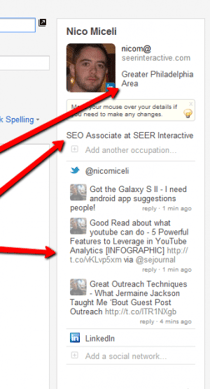
This tool also shows you their recent tweets and their photo. Now think what how much more you can learn about the person you’re reaching out to when you know what they look like or notice they recently twitted about a sports team or hobby that you share. Obviously you can get all this information with digging but this post is about speed. Throw their ambiguous email address in the bar then boom you got their name, where they are from, and social networks which will help you create a better email and more importantly create a longer lasting relationship with the blogger.
Tip 3 - Speed Up Outreach Without Sounding Like A Mass Email
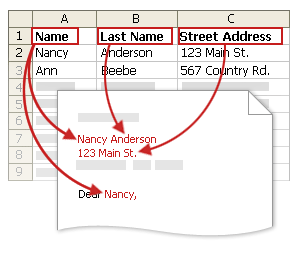
Link Building outreach comes with another side, a side that is an unfortunate necessity, the mass outreach. This is when you have a lot of bloggers or sites that you want to reach but you’re on a time table and don’t have time to personally write to all of them so you create a template. Now we have a template which will save time but we aren’t out of the woods yet – we have to copy it in to Gmail and replace the space fillers with the bloggers name, site, incentive, ect ect. But after you knock out 20 emails you then notice an error, (and if you are in SEO and do a lot outreach you know the feeling I’m about to express) – it hits you and then time slows down almost to a screeching halt and your stomach drops to the floor because you just realized that you left in a space filler and have been saying “I really liked [blog name here] and think it will be a great fit.” You know that you actually did check out the blog and liked it but now it looks like you don’t care at all (Check out Brett’s post about how to recover from that). But there’s a solution and easy fix to stop that from happening! Mail merges AKA form letters can solve that problem.
What are they?
They take your letter in MS Word and let you add in space fillers that correspond with an Excel workbook and will populate what the contents of a certain cell/row into your MS Word document.
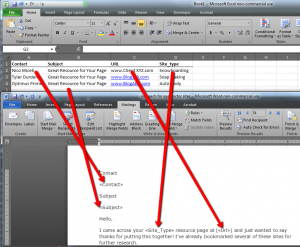
For detailed instructions on how to set one up check out Microsoft’s help tutorial for sending mail merges.
This is definitely the best tool that I use! Once you link your Word doc to Excel and your Excel doc has all the right information you can never miss a space filler. However, I don’t like to automate the entire process; I just use the filled in letter and copy it in to a Gmail message. Sometimes I like to add in another line or something else I liked about their site that isn’t always mutual with the other sites. Also, a lot of the time you are going to have to copy the message and paste it in a contact form.
Tip 4 - Following Up Just Became Easier
Boomerang for Gmail is great tool that I mostly use this for is follow up. Let me present you with a scenario to show why it’s so is great for a linking builder doing outreach.
You just outreached to 50 different bloggers for a new cool infographic and you tag them all with a label but you want to make sure you follow up with all of them. Now you can set a reminder and leave yourself a note but we all know that some of them slip through the cracks.
Now to solve this problem I use boomerang for Gmail, because you can set the email when you want to be reminded – and the way it reminds you is by putting the email at the top of your inbox’s unread section. I use this in addition to labels and reminders but I just feel it works a little more effective because it’s pretty hard to ignore a new email that is sent and personally I am one of those people who hate unread notifications on my computer, email, and cell phone.
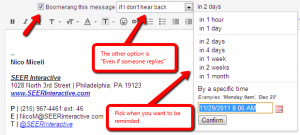
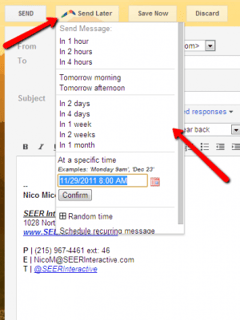
Another great thing that you can use Gmail for is scheduling outreach so it hits bloggers email accounts at a time that is great for them. Let me present you with another scenario to show you why it can help.
You are outreaching to mom bloggers but your schedule was crazy and didn’t finish the outreach message 'til the evening but you are worried that if you send them the email at night or before a long weekend it might get bunched up with other emails and over looked or deleted.
Now I do know there are other ways to handle this problem but so far boomerangs Send Later feature works the best for me. This is also useful for dealing with time changes, sending an email at 9am to someone on the west coast? Schedule the email to be sent in 3 hours so it hits their computer at 9am LA time. Are you a night owl and working late but don’t want to bother bloggers with email at 2am or on the weekend? Schedule the email to hit later, and they now even have an App for mobile phones!
Tip 5 - Don’t Repeat Emails, Use Canned Responses
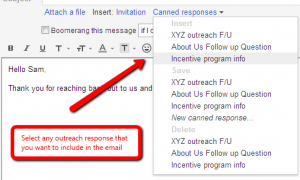
Canned Responses is mentioned in a couple different SEER Posts but I use it for a slightly different reason. A lot of times I will get similar questions from people who I reached out to along with having to follow up with some unresponsive folks. So what should I do to make this faster? Should I create a bunch of templates in word and fill up my Documents folder? No! There is a nice little gem called Canned Responses that can be found in Google Labs and it saves me lots of time when following up because it holds a formatted block of text. I can start an email and answer their questions that are unique, then use Canned Responses to answer the ones that are common.
Do you have any outreach tips that have helped you in the past? If so, please share them in the comments section and don't forget to follow me on twitter