This post is a bit old, we have some newer posts on extensions to help you in addition to the great ones below, first is this one for analytics geeks, and secondly this is a generic best chrome extensions plugin.
There's only so much time in a day, which is why we always look for ways to automate repetitive processes. When we could focus on developing tools to scale link research, writing macros in Excel to evaluate data, or hacking APIs, why waste time on basic, redundant tasks? Browser extensions are a staple for time-saving, so check out these 10 extensions to save time while improving your use of Google Analytics.
1) Analytics Helper
Good for: All Google Analytics Users GA version: All Browser: Chrome Download: here Disclaimer: Tool has occasionally given false negatives, particularly about issues with the code, but never gives a false positive.
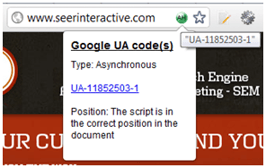
What it does: Notifies users immediately to whether the Google Analytics code is detected on a page while browsing. Includes the code type (asynchronous, traditional), any UAs present on the page, and a quick blurb on the code position.
2) Better Google Analytics
Good for: All Google Analytics Users GA version: Old version Browser: Firefox Download: here Disclaimer: Original userscripts don't all function.
What it does: A compilation of Greasemonkey userscripts by Erik Vold, Tyson Kirksey, and other talented developers, including some favorite functions:
- Add Social Media Metrics
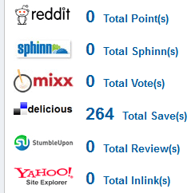
- Export to Google Docs

- Cleaner profile switching - Keeps the date and report intact when you switch reports.

- Access "Profile Settings" from any screen (also seen above).
3) Copy Profiles in Google Analytics
Good for: Google Analytics Power Users GA version: Old version Browser: Firefox Download: here Disclaimer: Filter order is not maintained when profiles are copied. Doesn't copy Event goals that were set up in GA v5. When working on a profile with Event goals already set up, Paste functions times out when it gets to that goal.
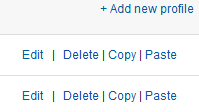
What it does: This is a Greasemonkey script that makes it easy to replicate Google Analytics profiles. When goals, filters, users, and settings are 90% the same across 10 profiles, why waste time creating the same initial profile 10 times? This script literally lets users hit "Copy" and "Paste" to have the initial work automated. Plus it's really fun to watch while pasting!
4) Goal Analytics Goal Copy
Good for: Google Analytics Power Users GA version: Old version Browser: Firefox Download: here Disclaimer: Works on up to 5 goals. Doesn't always save the "Required step" checkbox. Doesn't copy Event goals that were set up in GA v5.
What it does: When profiles are already in place, #2 above is not a good solution, but neither is manually creating the same goal a dozen times. Solution? GoalCopy Firefox extension! Copy individual goals from one profile to another.

5) GA Bookmarks
Good for: Google Analytics Power Users GA version: Old version Browser: Chrome and Firefox Download: here
What it does:This tool also copies goals and filters, as well as profiles, by creating easy bookmarks. (Prior to the creation of #6 below, I always used this for Chrome. Now I use this tool primarily to set the filter order across multiple profiles.)

6) GA Copy & Paste (aka My New Favorite Plugin)
Good for: Google Analytics Power Users GA version: New version Browser: Chrome Download: here Disclaimer: Not sure what the limits are yet. At one point, I had 11 goals and six filters saved. This tool is still being worked on.
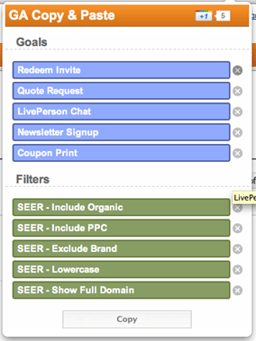
What it does: Similar to #4 above, GA Copy & Paste is a brand new Chrome plugin. Props to Educardo Cereto of Cardinal Path for this tool! Goals and filters are ridiculously easy to copy and paste, even easier to delete. The appearance is clean and perfectly matches GA.
7) gaSwitchr
Good for: All Google Analytics Users GA version: Old version Browser: Chrome Download: here
What it does: Switch between profiles, but keep the report and date settings.

8) Straight to Google Analytics
Good for: All Google Analytics Users GA version: All Browser: Chrome Download: here
What it does: Jump right into Google Analytics without clicking the "Access Analytics" button.
9) RegEx Checker
Good for: Google Analytics Power Users GA version: All Browser: Chrome Download: here
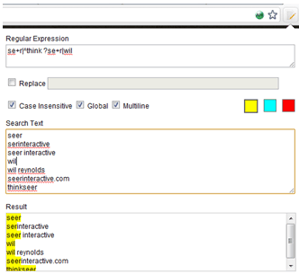
What it does: Handy little browser add-on Regular Expression checker to use when creating filters and goals.
10) Google Analytics Debugger
Good for: Google Analytics Power Users GA version: All Browser: Chrome Download: here
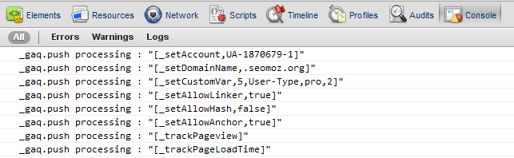
What it does: Check your analytics code for errors without waiting 24 hours. Detailed explanation from Chris Le can be found here. (Firecookie can be used similarly for Firefox, but I never use it.)
Bonus - Add-on Compatibility Reporter
Good for: Everyone GA version: N/A Browser: Firefox Download: here
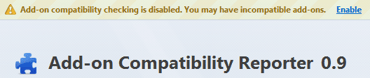
What it does: This last tool isn't GA-specific, but is probably one of the biggest lifesavers on the list. Looking at the Firefox extensions, they aren't all compatible with the latest version of Firefox. However, I'm not willing to lose my favorite extensions when Firefox updates. The Add-On Compatibility Reporter extension prevents Firefox from checking compatibility. Almost every extension keeps working, no matter which version of Firefox is being used.
Were any of your favorite tools missed? Share them in the comments below!